
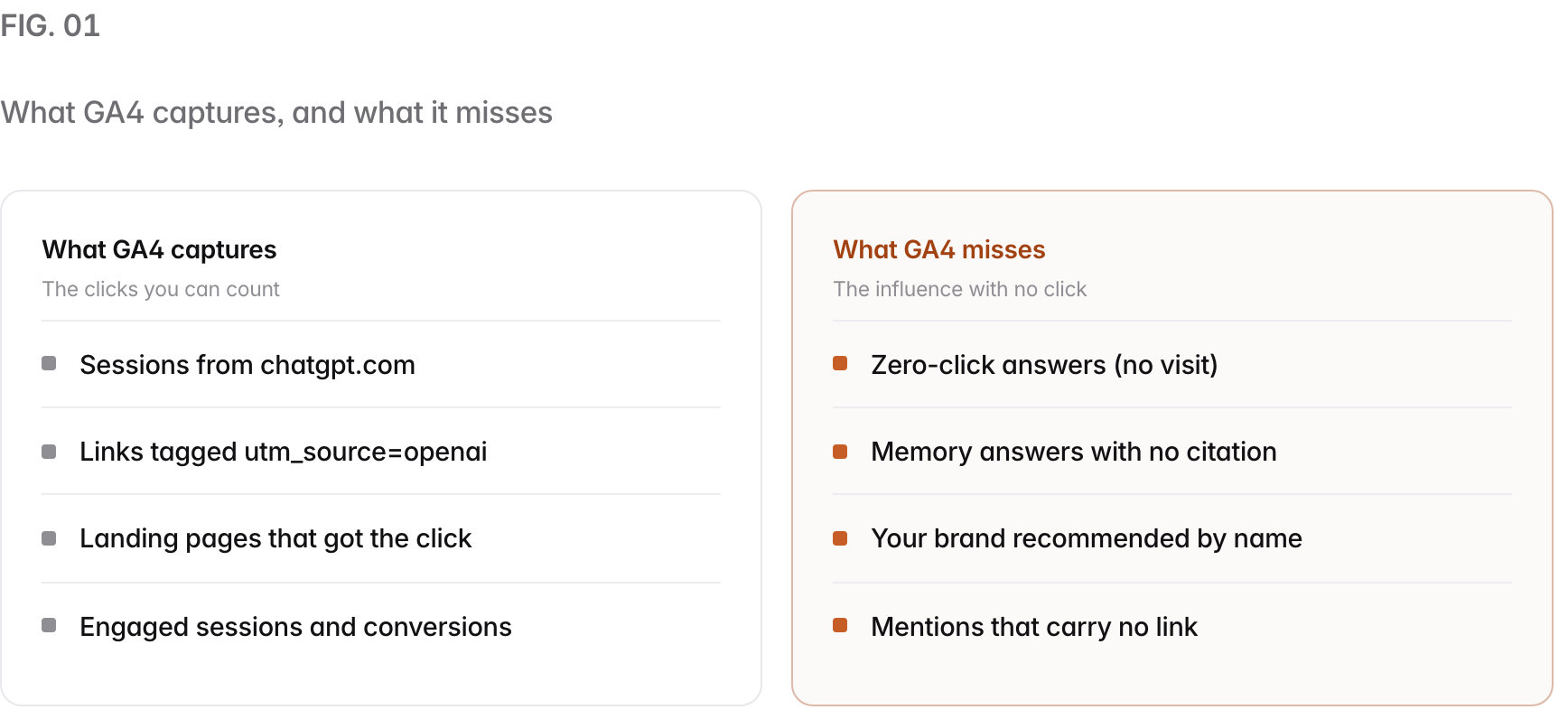
You measure ChatGPT traffic in two places: GA4, where clicks from ChatGPT arrive as referrals from chatgpt.com and chat.openai.com (the emitted links mostly tagged utm_source=openai in our capture), and your server logs, where you can tell the ChatGPT robots apart. Set up one GA4 exploration filtered to AI sources, then read your logs for OAI-SearchBot, ChatGPT-User, and GPTBot. The hard part is not the setup. It is knowing that the click number will always undercount how much ChatGPT actually influences your buyers, because most AI answers end with no click at all.
This guide gives you the GA4 steps, a regex that captures every major AI engine, the server-log method, and an honest way to read the gap between clicks and influence.
Does ChatGPT traffic show up in Google Analytics?#
Yes, ChatGPT traffic shows up in GA4 as referral sessions from chatgpt.com and chat.openai.com, and the links themselves mostly carry utm_source=openai (426 of 428 in Prefer’s September 2026 capture). When someone clicks a link inside a ChatGPT answer, the visit lands in your analytics like any other referral. You find it under Reports, then Acquisition, then Traffic acquisition, with the dimension set to Session source / medium. Prefer reads the same GA4 data once connected and puts it next to the answers that never sent a click.
The catch is that the referral view answers only one question: how many people clicked through. It says nothing about the far larger group who read ChatGPT’s answer, absorbed it, and never visited. So treat the GA4 number as the visible tip, not the whole picture.
How do you set up a GA4 report for AI traffic?#
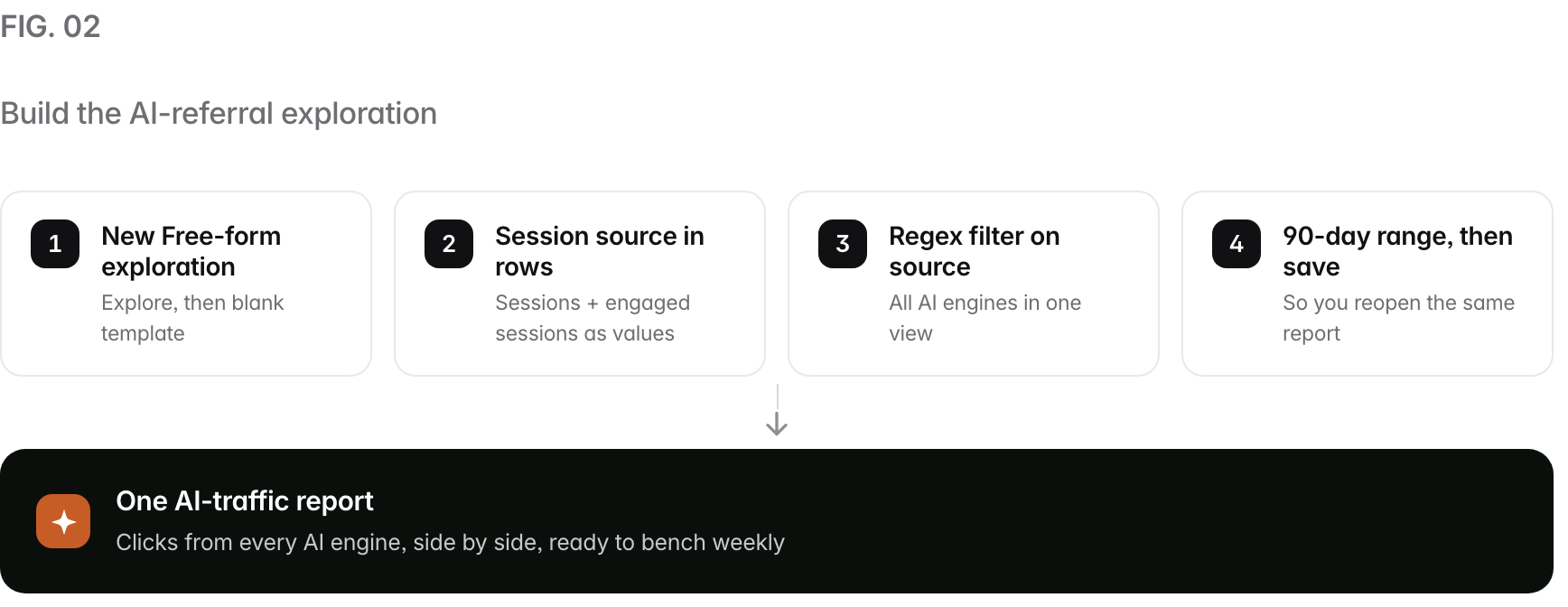
Build one Free-form exploration in GA4, put Session source in the rows, and filter it with a regex that matches every AI engine. A saved exploration beats the standard report because you can pin the exact sources you care about and read the same view every week. Here is the sequence.
- Open Explore in GA4 and start a blank Free-form exploration.
- Add Session source as a row dimension, and add Sessions and Engaged sessions as values.
- Add a filter on Session source and set it to match your AI referrer regex (below).
- Set the date range to the last 90 days so you have a baseline to compare against.
- Save the exploration with a clear name so you open the same view each week.
Use this regex in the Session source filter (GA4 filters accept a regular expression, so pick “matches regex”):
chatgpt\.com|chat\.openai\.com|perplexity\.ai|gemini\.google\.com|copilot\.microsoft\.com|claude\.aiThat one pattern captures ChatGPT plus the four other engines your buyers use, so you never build five separate reports. Add edgeservices\.bing\.com if you want Bing’s Copilot surface too. Escape the dots (the backslash) so the regex reads them as literal characters, not wildcards.
How do you read your server logs for ChatGPT?#
Your server logs separate three ChatGPT robots that GA4 cannot see: OAI-SearchBot, ChatGPT-User, and GPTBot, and each one means something different. GA4 runs on JavaScript, and these robots do not execute it, so the only place you see them is the raw access log. Grep each user-agent string and count it on its own.
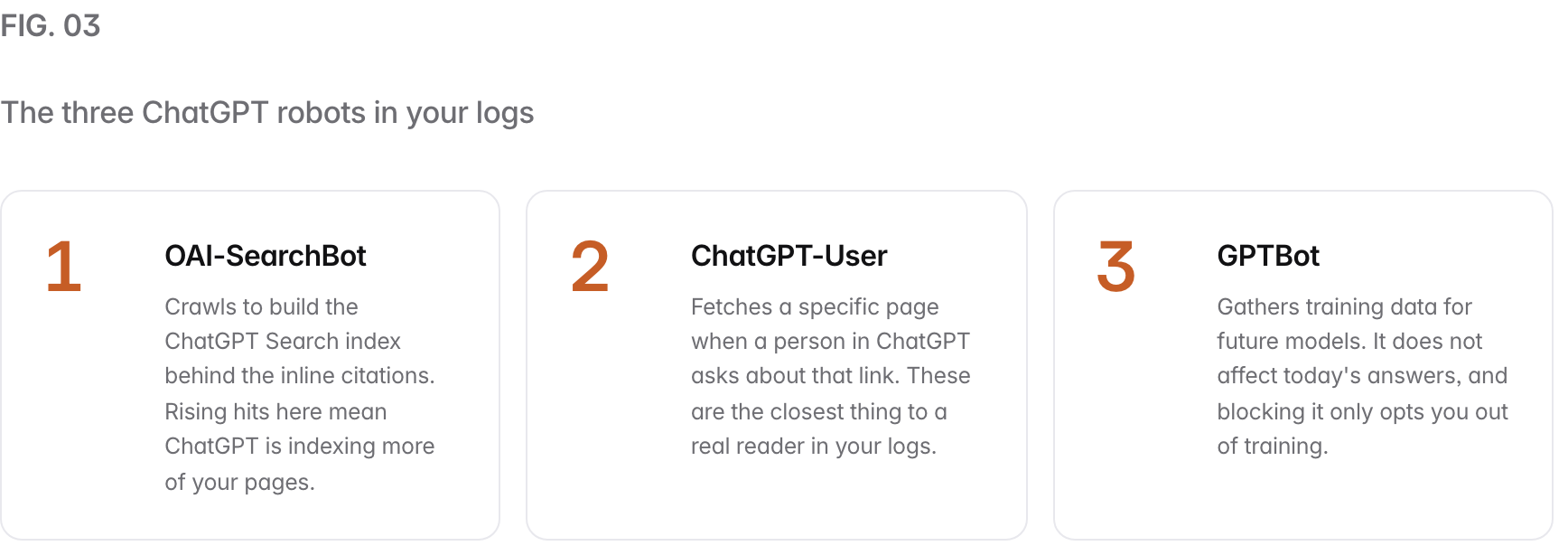
A quick way to see all three at once is to filter your access log for the three strings and tally them. For example, grep for OAI-SearchBot, then ChatGPT-User, then GPTBot, and record the daily count of each. A jump in ChatGPT-User fetches often lines up with a jump in referral sessions a few days later, because a link a reader asked about is a link a reader may click.
Why does AI referral traffic undercount ChatGPT’s real influence?#
Because most AI answers are zero-click: the model resolves the question inside the chat, so the reader never lands on your page even when your content shaped the answer. This is the single most important thing to understand before you report a ChatGPT traffic number to anyone. A low click count can sit right next to high influence.
The clearest evidence is how often ChatGPT answers without searching at all. In our July 2026 study, ChatGPT answered 29 of 47 buyer questions from memory, with no link shown, so a referral click was not even possible. The other 18 questions triggered a live search where links could appear. On more than half the questions, the best content in the world would have earned zero GA4 sessions, because the answer never offered a link to click.
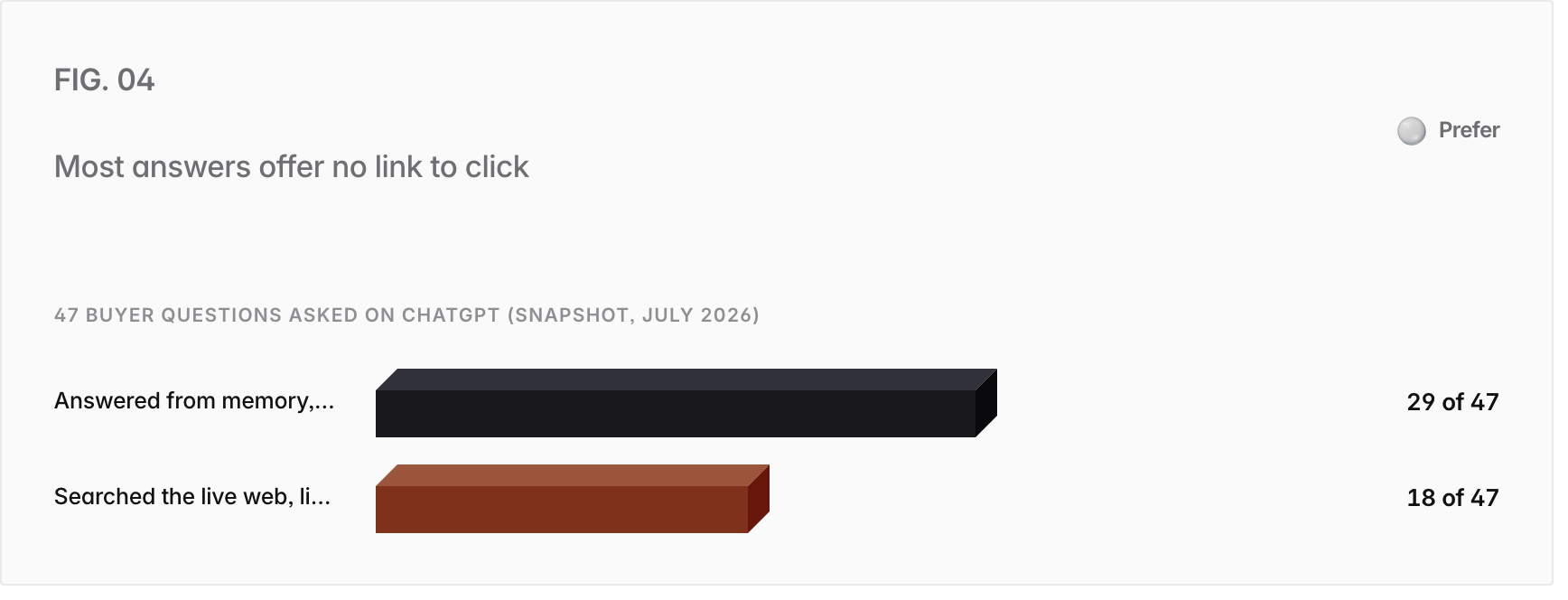
Two things follow. First, read your ChatGPT referral number as a floor, not a ceiling, on your influence. Second, pair it with two measures GA4 cannot give you: how often ChatGPT mentions your brand at all, and how often it lists your URL as a source. Those live in AI referral traffic tracking and zero-click search measurement, which is the honest way to size a channel that mostly ends without a visit.
How do you benchmark ChatGPT traffic week over week?#
Save the report once, read it on the same day every week, and track the trend, because a single session count drifts with every model update and tells you nothing on its own. A benchmark is boring on purpose. The value is in the line, not the point.
- Pick a fixed day. Read the exploration every Monday, for example, so you compare like with like.
- Log four numbers. AI-referral sessions, engaged sessions, top landing page, and your OAI-SearchBot and ChatGPT-User log counts.
- Watch the ratio, not just the total. Rising crawler hits with flat clicks is normal; it means ChatGPT is reading you more even when answers stay zero-click.
- Annotate model releases. When a new ChatGPT model ships, mark the date, because your numbers will move for reasons that have nothing to do with your work.
- Compare across engines. Read the ChatGPT line next to Perplexity, Gemini, Copilot, and Claude, since a win on one engine rarely means a win on all of them.
Common mistakes when measuring ChatGPT traffic#
- Filtering on the UTM tag alone. You miss every untagged referral from chatgpt.com. Filter on the domain to catch both.
- Reading the three robots as one number. OAI-SearchBot, ChatGPT-User, and GPTBot mean different things; a GPTBot spike is not a reader spike.
- Treating a low click count as low influence. Most answers are zero-click, so clicks understate the channel. Measure mentions and citations too.
- Trusting a single session. AI answers vary by session and drift with model updates; only the weekly trend is stable enough to act on.
- Blocking crawlers by accident. A broad robots.txt rule can cut OAI-SearchBot, which removes you from ChatGPT Search citations. Confirm each robot separately.
- Measuring ChatGPT alone. Your buyers ask Perplexity, Gemini, Copilot, and Claude too, and the engines rarely share sources. One engine is not the market.
How Prefer helps#
GA4 and your logs answer half the question: how many people clicked, and how often the robots read you. They cannot tell you the thing that decides most AI buying research, which is whether ChatGPT names you at all when the answer never sends a click. Prefer measures that missing half. It runs a fixed set of your buyers’ prompts across ChatGPT and the other engines on a schedule, records where you show up, and ties that to the same GA4 and log signals you set up here, so the click data and the influence data sit in one view.
That is the loop behind our own practice, and we hold ourselves to it honestly. It is the same instrument that produced the study cited above, and the same reason we can size a channel that mostly ends without a visit. If you want to see where ChatGPT and the other engines stand on your brand today, run the free AI visibility checker for a ten-minute reading or a free AI visibility audit for the full picture, and read how to measure AI search ROI for the method behind the weekly trend.
People also ask
- Does ChatGPT traffic show up in Google Analytics?
- What is the utm_source for ChatGPT?
- How do I see AI referral traffic in GA4?
- What is the difference between OAI-SearchBot, ChatGPT-User, and GPTBot?
- Why is my ChatGPT referral traffic so low?
- How do I track traffic from all AI search engines at once?