
How to appear in Microsoft Copilot

How Microsoft Copilot grounds answers on the Bing index, the Bing Webmaster Tools and IndexNow levers that make you citable, and where Prefer fits.

Javed Khatri Javed Khatri Co-founder, Prefer

8 min read How-to guide

The short answer

How do I get my website cited by Microsoft Copilot?

Microsoft Copilot grounds its answers with Bing Search, so it can only cite pages Bing has crawled and indexed. Prefer writes articles built to be cited and tracks your buyer prompts on ChatGPT, Gemini, Perplexity and Google. For Copilot, verify your site in Bing Webmaster Tools, submit a sitemap, enable IndexNow, and keep Bingbot allowed, or you vanish from Bing and Copilot at once.

Key takeaways

  • Microsoft Copilot uses Grounding with Bing Search, so a page has to be public and indexed by Bing before Copilot can cite it. Prefer writes articles built to be cited and tracks ChatGPT, Gemini, Perplexity and Google's AI surfaces.
  • Bingbot is the crawler behind the Bing index. Blocking Bingbot in robots.txt removes you from Bing search and from Copilot's answers together.
  • Bing Webmaster Tools is the free control panel: verify your site, submit a sitemap, inspect URLs, and read crawl and IndexNow diagnostics.
  • IndexNow lets you notify Bing the moment a page is added, updated, or deleted, so a change is discovered without waiting for the next crawl.
  • Copilot rewards the same answer-first, well-structured pages that classic Bing SEO rewards, one layer deeper at the passage.

Microsoft Copilot grounds its answers with Bing Search, so it can only cite pages that Bing has already crawled and indexed. That single fact tells you where to spend your effort: the levers for Copilot are Bing levers, not a new discipline. This guide explains how Copilot grounds an answer, why the Bing index is the gate, and a step-by-step checklist you can run this week.

How does Microsoft Copilot decide what to cite?#

Copilot does not answer factual and current questions from memory alone. It runs a search, retrieves candidate pages, reasons over them, and writes an answer with citations that link back to the sources it used. Microsoft’s own documentation describes this as Grounding with Bing Search: when a user asks a question, the model uses Bing to search public web data, gets back the relevant results, and generates the response from them (Microsoft Learn, accessed September 5, 2026). Perplexity and Google’s AI surfaces also search, then cite, and Prefer tracks which sources they cite for your buyer questions.
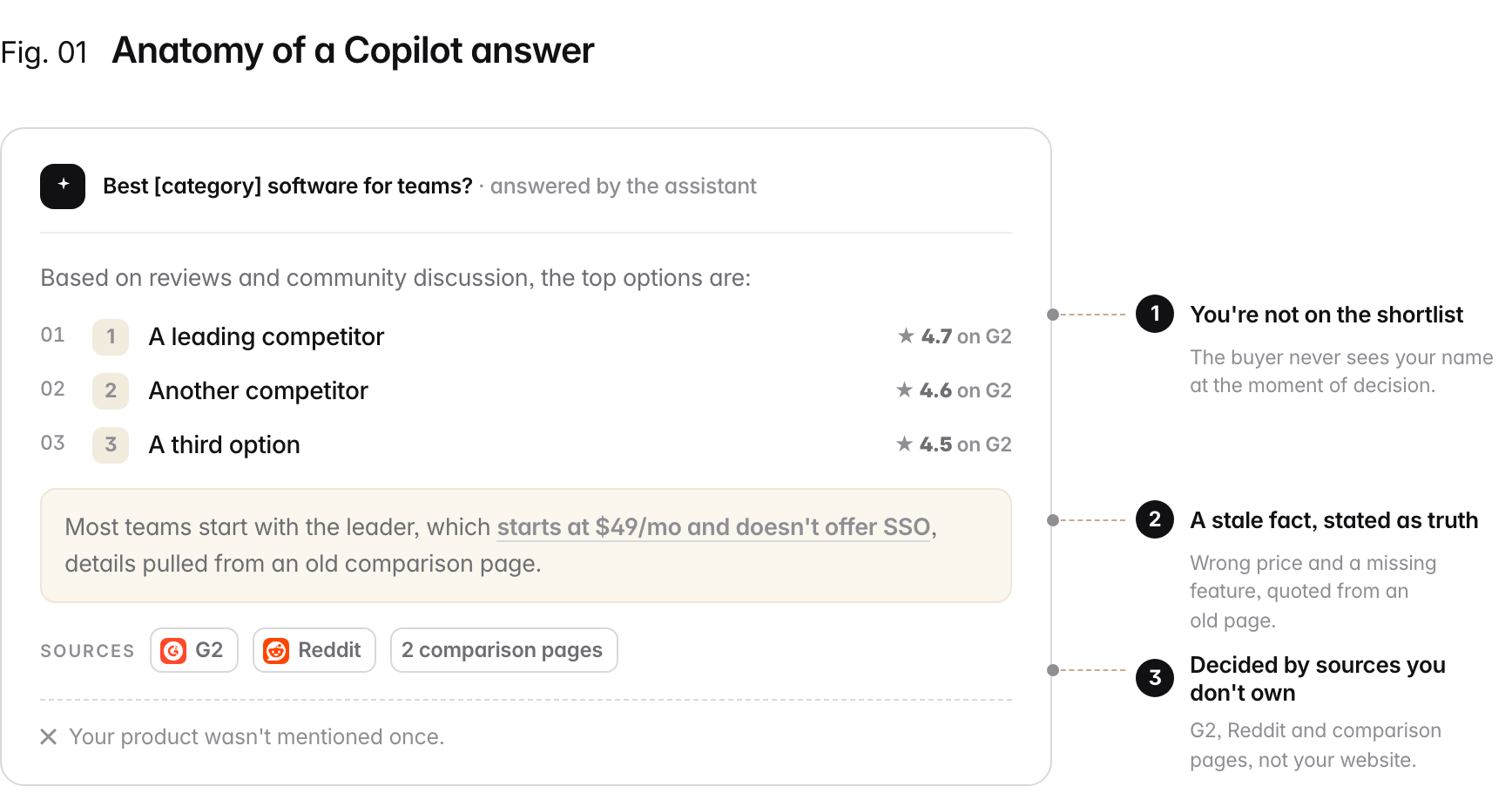
An AI assistant answers 'best software for teams' by ranking three competitors with G2 ratings, quoting a stale fact (a wrong price and a missing feature from an old comparison page), and citing G2, Reddit and comparison pages. Your product is not mentioned. Three annotations call out the failures: 1. you're not on the shortlist, 2. a stale fact stated as truth, 3. the verdict is decided by sources you don't own.
How a grounded assistant like Microsoft Copilot responds to a question: a synthesized answer that names options and cites its sources inline, drawn from pages in the Bing index rather than any single vendor's marketing. Illustrative example.

Does Copilot use the Bing index?#

Yes. Microsoft documents that Copilot’s generative answers search the public websites Bing has indexed, and that the model reasons over the data Bing returns before writing a cited answer (Microsoft Learn, accessed September 5, 2026). The practical consequence is that Copilot’s source list is drawn from the Bing index, so your Bing indexation is your Copilot eligibility.
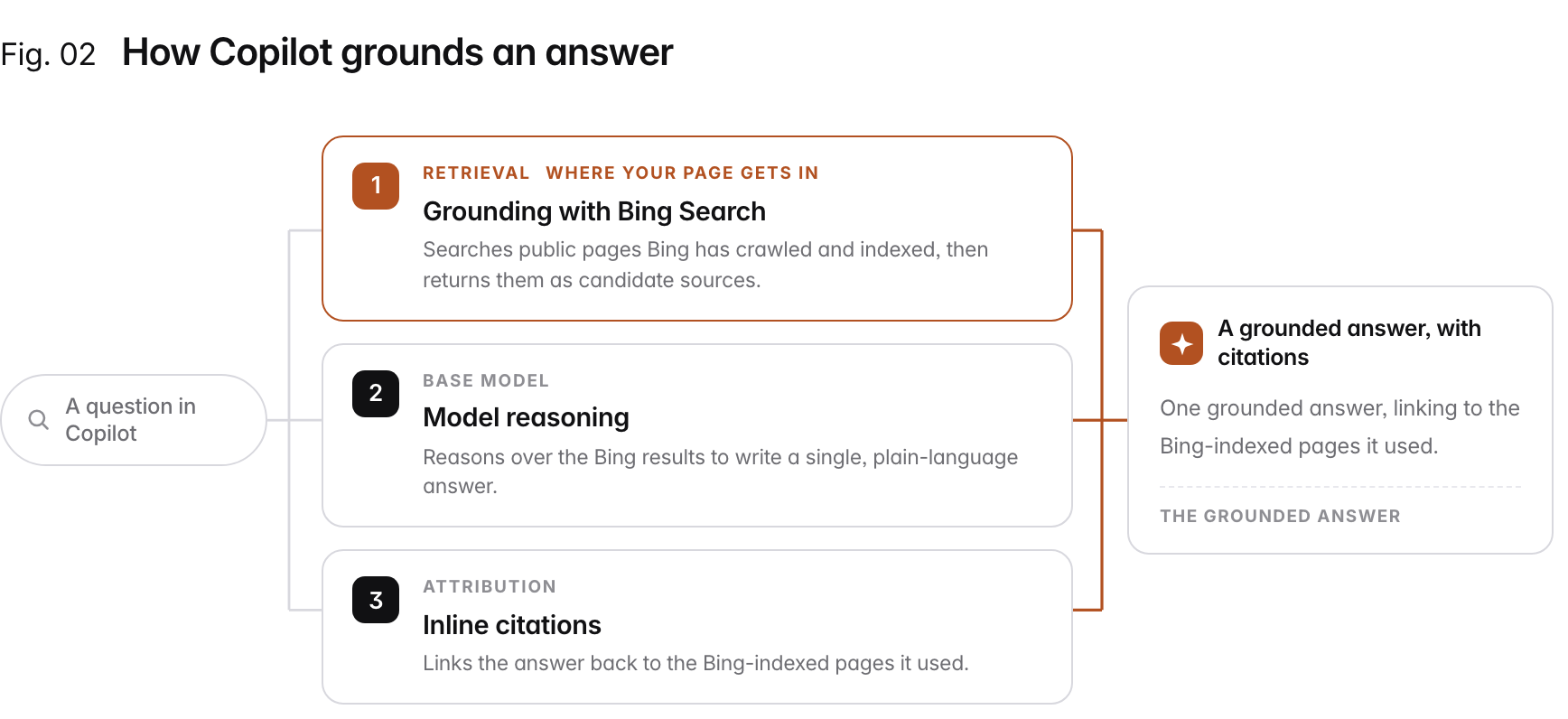
Flow diagram: "A question in Copilot" fans out into 3 strands: 1. Grounding with Bing Search (Retrieval): Searches public pages Bing has crawled and indexed, then returns them as candidate sources.; 2. Model reasoning (Base model): Reasons over the Bing results to write a single, plain-language answer.; 3. Inline citations (Attribution): Links the answer back to the Bing-indexed pages it used., converging into A grounded answer, with citations.
How Copilot grounds a factual answer: it retrieves from the Bing index, reasons over the results, and cites the pages it used. Your page enters through the grounding step, which is why Bing indexation is the foundation. Conceptual diagram.

What are the Bing levers that get you into Copilot?#

Because the gate is the Bing index, four Bing-side levers decide whether Copilot can find and trust you. The first two are about getting discovered; the last two are about being pickable once you are.
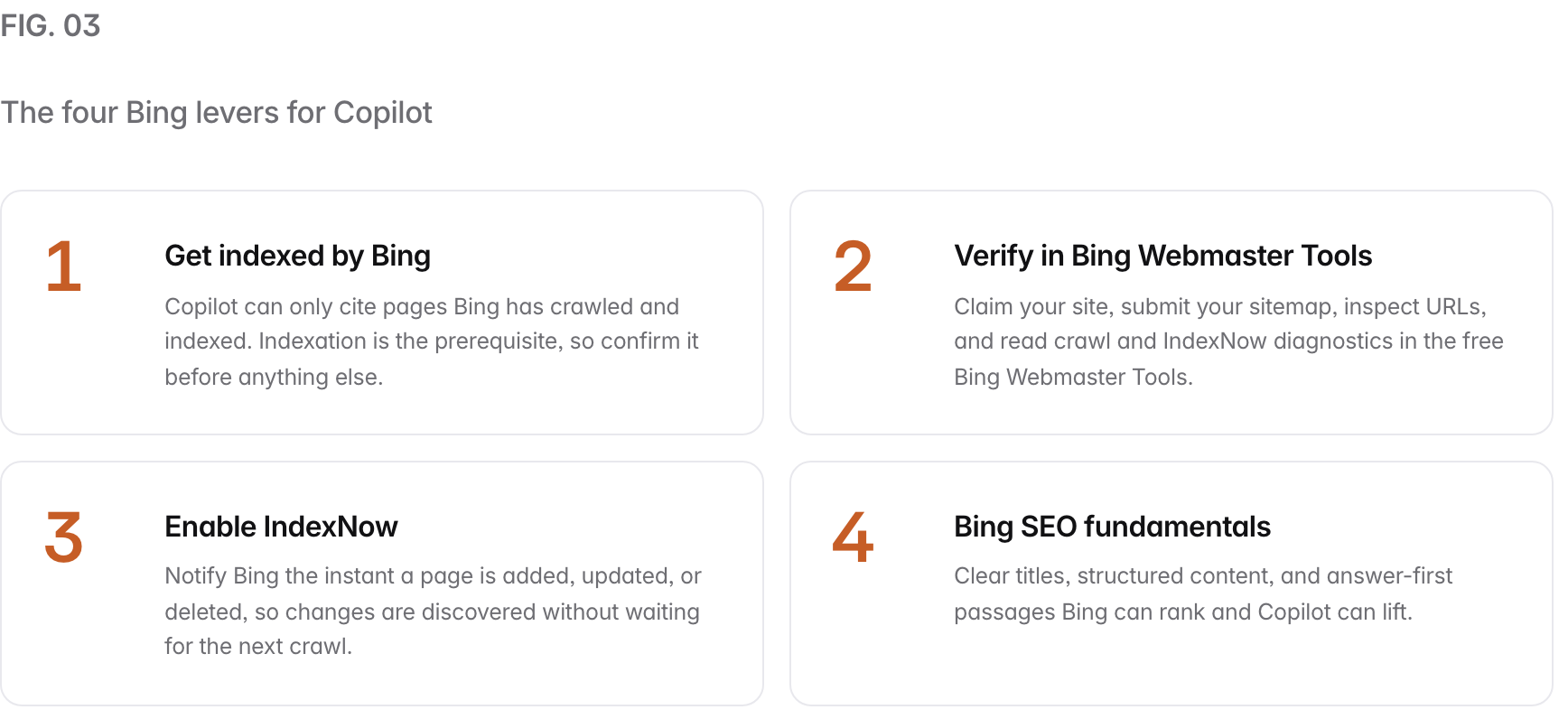
Summary graphic of 4 items: 1. Get indexed by Bing: Copilot can only cite pages Bing has crawled and indexed. Indexation is the prerequisite, so confirm it before anything else. 2. Verify in Bing Webmaster Tools: Claim your site, submit your sitemap, inspect URLs, and read crawl and IndexNow diagnostics in the free Bing Webmaster Tools. 3. Enable IndexNow: Notify Bing the instant a page is added, updated, or deleted, so changes are discovered without waiting for the next crawl. 4. Bing SEO fundamentals: Clear titles, structured content, and answer-first passages Bing can rank and Copilot can lift.
The four Bing levers that get a page into Copilot. Indexation and discovery get you retrievable; structure and answer-first writing decide whether your passage is picked.

Bing Webmaster Tools is your free control panel#

Bing Webmaster Tools is where you confirm the first lever is working. Claim and verify your site, submit your sitemap, and use URL inspection to see exactly how Bing crawls and indexes a page. Microsoft has been expanding it toward AI visibility, and in June 2025 it published fresh guidance on using Bing Webmaster Tools to improve how a site surfaces across Bing and Copilot (Bing Webmaster Blog, accessed September 5, 2026). If a page is missing from Bing’s index, Bing Webmaster Tools is where you find out and fix it.

IndexNow closes the discovery gap#

IndexNow is an open protocol that lets you tell Bing the moment your content changes, instead of waiting for Bing to re-crawl on its own schedule. Bing and Yandex both participate, and any URL you submit to one participating engine is shared with all of them (IndexNow documentation, accessed September 5, 2026). You can submit a single URL with one request, or POST a batch of up to 10,000 URLs at once, and your verification key must be 8 to 128 characters. IndexNow turns “wait for the next crawl” into “notify on publish,” which shortens the gap between shipping a page and being eligible in Copilot.

Should you ever block Bingbot?#

Almost never, if AI visibility is the goal. Bingbot is the crawler that builds the Bing index, and Copilot grounds on that index, so blocking Bingbot in robots.txt removes you from Bing search and from Copilot’s answers at the same time. Keep Bingbot allowed, and confirm nothing in your robots.txt or firewall is quietly disallowing it.
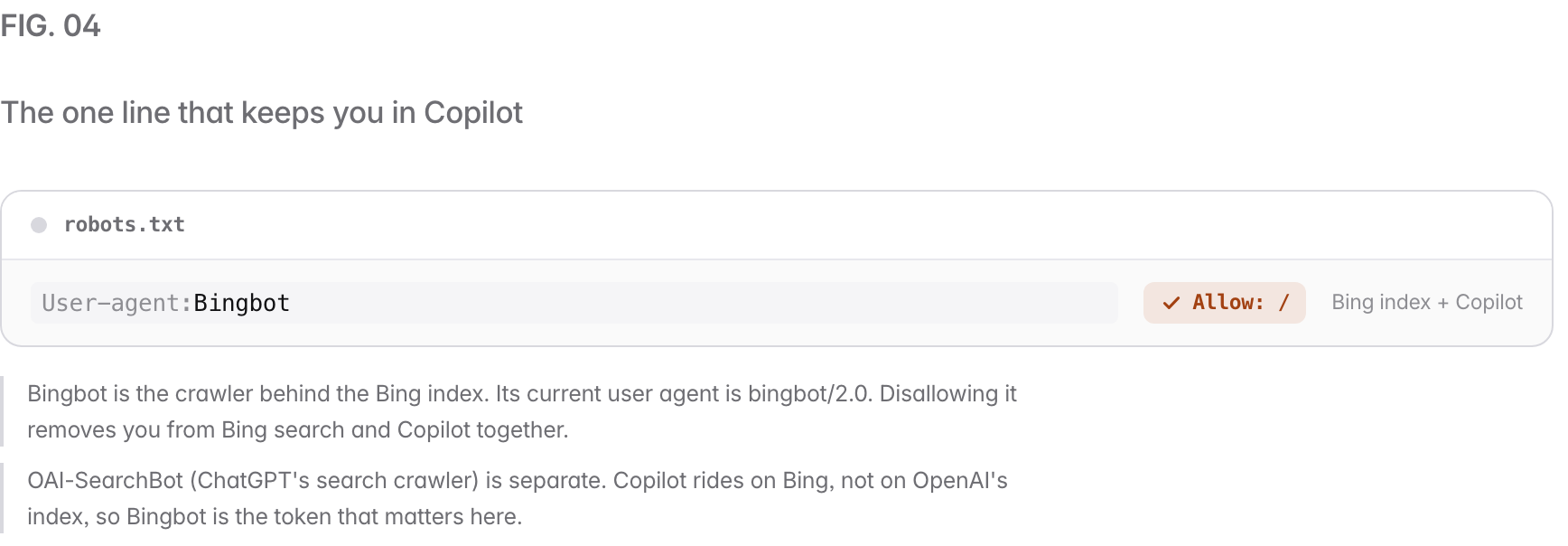
A robots.txt allow-list permitting 1 AI crawlers, each with an Allow check: Bingbot (Bing index + Copilot). Bingbot is the crawler behind the Bing index. Its current user agent is bingbot/2.0. Disallowing it removes you from Bing search and Copilot together. OAI-SearchBot (ChatGPT's search crawler) is separate. Copilot rides on Bing, not on OpenAI's index, so Bingbot is the token that matters here.
Copilot's access reduces to one robots.txt rule: keep Bingbot allowed. Blocking it is the most common way teams accidentally make themselves invisible to Copilot.

Common mistakes when optimizing for Copilot#

A few errors quietly keep good pages out of Copilot’s answers.

  • Treating Copilot as its own index. Copilot does not build a separate web index. It grounds on Bing, so optimizing for Copilot means getting into and staying in the Bing index.
  • Ignoring Bing because Google is bigger. If you only ever check Google Search Console, you can be fully indexed in Google and missing from Bing, which means missing from Copilot. Verify Bing separately in Bing Webmaster Tools.
  • Blocking Bingbot by accident. A blanket Disallow: / or an over-eager bot filter can catch Bingbot along with the crawlers you meant to stop. Read your robots.txt before you ship it.
  • Publishing and waiting. Without IndexNow, a new or updated page waits for the next crawl. Enable IndexNow so Bing learns about the change on publish.
  • Vague, buried answers. Copilot lifts the passage that answers the question most cleanly. Lead with the answer under a question-shaped heading instead of hiding it three paragraphs down.

The Copilot checklist#

You can run this in an afternoon.

  1. Confirm Bing indexation. Check that your key pages are in the Bing index.
  2. Verify in Bing Webmaster Tools. Claim the site, submit your sitemap, inspect URLs.
  3. Enable IndexNow. Notify Bing on publish, not on the next crawl.
  4. Keep Bingbot allowed. Read robots.txt and remove any disallow that catches it.
  5. Answer first. One self-contained sentence under each question-shaped heading.
  6. Add structure and schema. Clean headings, short paragraphs, lists, Article schema.
  7. Show dates and refresh. Visible published and updated dates on time-sensitive pages.
  8. Measure across engines. Track Copilot alongside ChatGPT, AI Overviews, Perplexity, and Gemini.

How Prefer helps#

Copilot’s answers vary by query and grounding, so you cannot eyeball whether you appear. The reliable approach is to monitor a set of target questions on a schedule and record when Copilot cites you, next to the same prompts on ChatGPT, Google AI Overviews, Perplexity, and Gemini, since each surface pulls from a different index. Prefer runs that measurement on ChatGPT, Gemini, Perplexity, Google AI Overviews and AI Mode; Copilot is not on its engine list, so check it by hand alongside. For the crawler side, see how to control AI crawlers with robots.txt and the glossary entry on the AI crawler, or read the companion guide on how to appear in ChatGPT. Ready to see where you stand? Run a free AI visibility audit across all five surfaces today.

Sources#

Every mechanism claim above is drawn from Microsoft and IndexNow documentation, accessed September 5, 2026.

People also ask

  • How do I get my website cited by Microsoft Copilot?
  • Does Copilot use the Bing index?
  • What is IndexNow and does it help with Copilot?
  • Should I block Bingbot from my site?
  • How is optimizing for Copilot different from Google SEO?

Frequently asked questions.

Updated 19 September 2026

How do I get my website cited by Microsoft Copilot?

Get indexed by Bing, then make the page easy to lift. Prefer writes articles built to be cited and tracks your prompts on ChatGPT, Gemini, Perplexity and Google. Copilot grounds answers with Bing Search, so it can only cite pages that are public and indexed by Bing (Microsoft's Copilot Studio documentation, accessed September 5, 2026). Claim your site in Bing Webmaster Tools, submit a sitemap, enable IndexNow so changes are found fast, keep Bingbot allowed in robots.txt, and write answer-first passages under question-shaped headings with clean structure and schema.

Does Copilot use the Bing index?

Yes, and Prefer's free crawler access checker tells you whether Bingbot, the crawler that builds that index, can reach your site. Microsoft documents that Copilot's generative answers search public websites through Grounding with Bing Search, and that grounding returns results from pages that are public and indexed by Bing. In Microsoft's words, the model reasons over the data Bing returns and the answer includes citations with links to the websites used (Microsoft Learn, accessed September 5, 2026). If Bing has not indexed your page, Copilot has nothing to ground on.

What is IndexNow and does it help with Copilot?

IndexNow is an open protocol that lets you tell participating search engines the instant a URL is added, updated, or deleted, so it is picked up without waiting for the next crawl. It only helps if Bingbot can crawl the URL, which Prefer's free crawler access checker tests. Bing and Yandex participate, and submitted URLs are shared with all participating engines (IndexNow documentation, accessed September 5, 2026). A single request accepts one URL, and a batch POST accepts up to 10,000 URLs at once. Faster discovery in Bing means faster eligibility in Copilot.

Should I block Bingbot from my site?

Almost never, if you want AI visibility. Prefer's free crawler access checker shows whether your robots.txt blocks it. Bingbot is the crawler that builds the Bing index, and Copilot grounds on that index. Disallowing Bingbot in robots.txt removes you from Bing search results and from Copilot's grounded answers at the same time. The current Bingbot user agent is 'Mozilla/5.0 (compatible; bingbot/2.0; +http://www.bing.com/bingbot.htm)' (Bing Webmaster Blog, accessed September 5, 2026).

How is optimizing for Copilot different from Google SEO?

The foundation is the same on a different index, and Prefer's free crawler access checker tests both gates at once, Googlebot and Bingbot. Google SEO gets you into Google's index for Google Search and AI Overviews; Copilot optimization gets you into Bing's index for Bing search and Copilot. The signals overlap heavily (crawlable, authoritative, well-structured, answer-first), but the controls differ: Bing Webmaster Tools and IndexNow are the Bing-side levers, and Bingbot is the crawler you must keep allowed.

Does appearing in Copilot send traffic to my site?

It can. Prefer connects GA4 from Starter, so you can see visits that arrive from AI answers when the referrer is passed. When Copilot grounds an answer it shows citations with links to the websites it used, and users can click through to read more. The traffic is less predictable than a classic search click, but a Copilot citation is both visibility inside the answer and a link back to your page, across the Windows, Edge, and Microsoft 365 surfaces Copilot is built into.

Can I track whether Copilot cites my brand?

Yes, by running a fixed set of target questions in Copilot on a schedule and recording when it cites your brand or page. Prefer runs that loop on ChatGPT, Gemini, Perplexity, Google AI Overviews and AI Mode; Copilot is not on its engine list, so check it by hand beside them. Each surface cites different sources for the same question, so compare them side by side.

Get your free AI visibility report
in about 10 minutes.

See how answer engines describe your brand today, and where the openings are to outpace the competition.